Dotted Eighth Delay Studies

Setting up the U2/Hillsong delay in a variety of situations.

The Sessionists

Esther Subra (vocals), Serena Chew (keys), Justin (guitars), Alphonsus (drums and percussion)

Thoughts on G.A.S.

Why you should save up for an expensive guitar.

Setting Up Disaster Area DPC-8EZ and DMC-8D MIDI Controllers

An easy-to-follow video tutorial to get those patches programmed!

An Overview of My YouTube Channel

Feel free to browse some of the playlists on my channel. Hopefully this leads to you liking and subscribing!

Showing posts with label Howto. Show all posts

Wednesday, March 13, 2019

Going Amp-less: A Step-by-Step Process


If you're looking to have a convincing amp tone through the front-of-house without using a physical amp, a preamp pedal by itself isn't going to be sufficient. In this latest video, I outline the process of going ampless with the Joyo British Sound, augmented by an EP Booster and an EQ section with the Line 6 M5.


Thursday, March 7, 2019

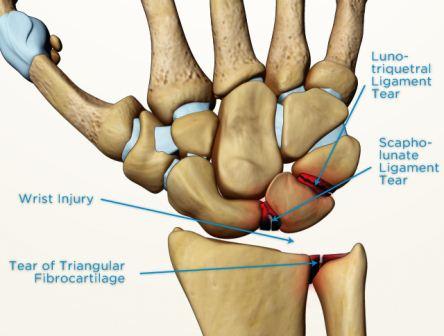
Managing Wrist Injuries as a Guitarist


  1. Get a wrist guard (1:41)
  2. Play with less gear (4:19)
  3. Modify your technique (5:33)
  4. Play an ergonomic guitar (7:35)
  5. Pray for healing! (9:05)
As some of you are aware, I have scapholunate dissociation in both my wrists. It's been a tumultuous journey, with its many days and nights of pain, with a constant cry to God for healing. There have been miracles and the tangible power of God in healing me. There have been moments where I believed God must not love me because of my constant pain.

But through it all, God is good. He has always been good. I may wear a guard now, but in time to come, I will not need it in the new heaven and new earth. But for now, for those fellow guitarists who suffer from wrist injuries, you are not alone, and your pain is not permanent! 

Thursday, June 22, 2017

Freedom Marches In (Hillsong United, Guitar Playthru Tutorial)

Hi all! I've come up with a video for the latest Hillsong United tune, with parts I think would be beneficial for beginners to learn.


Friday, June 16, 2017

Tones and Tips: Gretsch Duojet

I recently got a hold of a Gretsch Duo Jet. It's a completely unique instrument, with certain quirks that takes some time getting used to, and a sound that has twang and growl, a balance between a single coil and a humbucker.


Here's a video I made that shows the unique tones and control scheme for the Duo Jet. I would have spoken and have some dialogue, but there's constant construction happening around my new home!


Friday, June 9, 2017

Wonder (Hillsong United) - Guitar Playthru and Tutorial

I needed this recording, not in the sense of a monetary make-or-break for my channel, but I was feeling incredibly down this week. It's like there's been a dark cloud hanging over me, and it hasn't lifted. Everything was getting to me, and I didn't know how to change the way I felt about everything. I felt under-appreciated by everyone. And every memory of being taken for granted, of being abandoned, of being cast aside for the better ones--they all came crashing down on me.

I felt stifled, I felt choked. So I did the only thing I could, throwing my self into worship, hoping for anything, just anything from God, one word, one fragment of an encouragement from the one who made me to worship Him. And that search in prayer led me to the latest Hillsong United tune that Alphonsus introduced to me earlier--Wonder.

I did this in record time--listen to the parts, figure out an arrangement for solo guitar, dial in the correct tones, set up the camera, the recording interface, and hit record. I didn't care about the mistakes, I just went with the flow, letting myself get "lost in the wonder" (that's a terrifying thing for a seminary student to say). But alas, I'm tired of seriousness, tired of trying to be perfect. It's time to recapture the wonder.

Enjoy.

Friday, June 2, 2017

Jazz and Blues in Worship

Image result for jazz rock worship


I'm a fan of reharmonizing tunes to fit other contexts, and in my case where some of my musical upbringing took place playing in wedding bands, I learnt some Jazz and Blues. I'm not skillful in Jazz chops by any means, I'm just a fan of the genre, having picked up a few tricks of the trade from sitting through numerous sessions where I've had to figure out Jazz chords from scratch. But of course, I wasn't alone; my dear bassist Ben Sng is really good at picking out musical substructures that I can't begin to describe.

Here are some arrangements I've made for worship songs. They don't usually bode well with the congregation, but as offertory music, they seem to be appreciated there.


Friday, May 26, 2017

Lion and the Lamb (Bethel) - Guitar Playthru and Tutorial

This isn't another lead guitar cover. Here's a suggested lead and rhythm guitar arrangement for Bethel's "Lion and the Lamb", which I've come up with catering to the following scenarios:

  1. Your band doesn't have a keyboardist but you need to recreate the synth pulse.
  2. Your band doesn't have the expensive Strymon stuff to pull off the big, spacey-sounding lead tones.
With two electrics, you'll be able to cover enough tonal ground, and with the right arrangement, they'll complement each other to form a big sound.


Tuesday, May 23, 2017

How Great is Our God (Guitar Solo)


I was very refreshed to learn a Hebrew version of the song "How Great is Our God" recorded by Joshua Aaron. Right in the middle of it, there's a powerful, declarative guitar solo that spoke so much to me. Call me crazy, but the musician in me worships with solos! I decided to learn it and incorporate it whenever I get called to play this song. Be sure to check your pitch with those whole step bends!


For viewing Joshua Aaron's full song:


P.S.
This short recording was done with a whole new workflow, completely cutting out any Windows editing, and relying on Amplitube for recording the audio, and iMovie for editing the video with subtitles. I think I'm getting the hang of it!

Friday, November 4, 2016

The Sims Freeplay: Building a Factory to Generate Cash, Experience and LP's

I've recently got onto The Sims and tried my hand at playing it. It seems like conventional wisdom in life, like getting a job, career advancement, and improving your skills in your chosen profession don't work effectively in this game. Instead, being unemployed (which frees up your time) and working on your garden is the best way to generate cash, experience and lifestyle points! Allow me to direct your attention to the following video which really helped explain this anomaly of Sim economics:


A huge "thank you" to Make2, the wonderful couple who are a huge inspiration for all things Sims-related.

Here's a suggested "factory" layout to maximise the use of your Sims' time and energy. I took the liberty to make the factory look nicer by using the first house as its template, hence the blue flooring and a dedicated toilet.


Meeting Your Sims' Needs

To recap what the video tutorial said, your Sims have a few basic needs that the factory meets:

  • Food: Use the fridges to provide sustenance.
  • Sleep: They don't necessarily have to sleep, so use the coffee machines to keep them up indefinitely.
  • Toilet: Well, it seems the Sims don't mind being in a unisex, uncovered toilet.
  • Cleanliness: Kitchen sinks have the advantage of being able to keep your Sims clean (they don't necessarily have to bathe) and being the place they can clean up plates (in cooking to generate LP's).


The only critique I have for the factory is the lack of socialising, which I suppose we could spend some time with the Sims making conversations to fill that up.

Generating Cash and Experience
Gardening is the quickest way to earn cash and experience depending on the plant. Some plants have shorter growth cycles, such as corn which takes 20 minutes, while others can take up to a whole day. Pumpkins generate the most amount of experience, so it will really depend on your immediate needs.

Generating Lifestyle Points
The cooking hobby allows for all Sims to participate in chalking up hobby items. Once all hobby items are complete, you'll earn experience and prizes. Completing the hobby items consecutively earns you LP's, so get those Sims to make lots of cheese on toast, the quickest cooking task, and one which only requires a basic stove.

You will, however, need to exploit a bug in the game. Get one more countertop, place it in the corner, and buy a toaster. You will need to make the toaster face outwards, away from the "correct" orientation. For cheese on toast, the Sim will usually cook on a stove then head over to a toaster to finish off. However, with the toaster inaccessible, this last animation is totally bypassed. The kitchen sink is especially useful because it will allow your Sim to wash up the plates right there and then, instead of wasting time walking out to the trash.

Monday, May 9, 2016

Speaker Emulation: Do I Need It?

The short answer: most definitely. There's only one time a direct signal from the guitar into the board is acceptable, and that's to record a pure clean signal from the guitar. Jeff Baxter very famously recorded pure clean tracks for sessions when a clean guitar was required. Just check out what he says about equipment in the following video:


Here's a simple riff I recorded back-to-back, the first without speaker emulation, and the second with a 4x12" cab emulation from my Korg Pandora:


The distortion has peaks and spikes that are just ear-piercingly intolerable, doesn't it? Hence, a speaker emulation achieves its effect by mostly rolling off treble content.

Saturday, February 27, 2016

Direct Recording with the GT2

(This is an old post which was left in my "Drafts" folder, and I must have forgotten to publish it. So rather than keeping it hidden, here it is!)


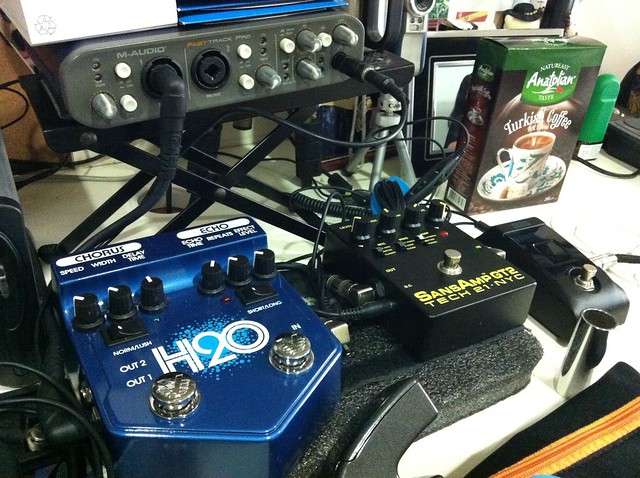
Less doesn't necessarily mean losing out. A smaller car is still a means of transportation, and it can have features which bigger cars lack (a retractable roof on a cabriolet over an ordinary sedan, for example). Likewise, when I was attempting to record using the SansAmp GT2, I found that its simplicity was its greatest strength. Here's my entire recording rig:

  • A tuner to keep the guitars in tune
  • The SansAmp GT2, an amp simulator with an arsenal of tone at my fingertips.
  • The Visual Sound H20, which provides depth to the tone with delay and chorus. I find that even when used in the "short" delay mode for a really fast slapback, the H20 has this effect of making your notes stick out more.
  • My trusty M-Audio Fast Track Pro. To keep the preamp noise of the FTP low, I set the gain to about 50% up, and adjust the Input gain of the GT2 to taste. I like to record to -6dB, which seems to be the threshold at which the guitar tone "speaks" with clarity, but that's my personal preference.


Character switches include
MIC:
  • Classic = distant miking without ambiance.
  • Center = close miking at the center of a speaker cone.
  • Off-Axis = close miking at the edge of a speaker cone.
MOD:
  • Clean, which gives you a stock tube amp set-up.
  • Hi Gain, which gives you an extra gain stage, as if you were to install an additional 12AX7 tube in the pre-amp section.
  • Hot-Wired, which gives you a scooped-out midrange for a sizzling, over-the-edge quality.
AMP:
  • Tweed = Fender®-style
  • British = Marshall®-style
  • California = Mesa Boogie®-style


Check out the Marshall tone from this setup!


It's great for bass tones too. I set this tone up using the manual's setting for "SVT Bass" style:


Friday, March 13, 2015

Viewing iCloud Calendar Events in Google Calendar

I wrote a short how-to for ministry members to view iCloud calendar events on their Google calendar spaces because some people just don't have iCloud access (being Android phone users). This is a short post, but I hope it helps you out as much as it helped me!

https://docs.google.com/document/d/1ucwY4RHrkpr6GU1JIS-yxZBDilq1D7-0cssAjGEPey0/edit?usp=sharing


Friday, September 5, 2014

Distortion vs. Overdrive: A Renewed Discovery


Fads. They're everywhere. They're a temporary fascination with something until the novelty wears off, only to be replaced by another. And the funny thing about fads is that they come in cycles. In the guitar world, I have seen quite a few fads: the rack-race, where it seemed fashionable to build the largest, bulkiest rack system, the Swiss army knives of multi-effects, where everyone wanted everything in as small a package as possible, and perhaps notably now, the era of trying to get the guitar to sound like a keyboard with the use of delay and reverb (a company starting with "S" should immediately come to mind).

It's also fashionable to own boutique overdrives--the more obscure the name, the better. The wierder the tone, the better too. If you're into the worship scene, the Instagramverse is chock full of worship leaders, worship pastors and electric guitarists owning boards boasting 4 to 5 overdrive pedals, each one not being very heavy, but I suppose the idea is that when stacked, they'll be able to achieve a chunky, beefy tone for distorted tones. But does it adequately substitute for an actual distortion pedal? Will one distortion pedal sound better than four overdrive pedals?

I think there is a time and a place for distortion in a worship song. Consider the following video where I try to let you hear the audible difference between distortion and overdrive pedals: the mid-hump which can be fatiguing to the ear.

This is not to say that the stacked overdrive sound is unusable. I think there is a way to shape the sound of stacked overdrives such that it can be used pleasantly, and there general guidelines to ensure that your listener isn't bombarded with a wall of shrill noise:

1. Lower gain into higher gain
The first pedal takes on the characteristics of an amp on mild breakup, and the second pedal acts like an overdrive into a mildly broken-up amp. The resultant tone is thick and liquid-like, and can be a great way to empower single-coil pickups.

2. Higher gain into lower gain
The second pedal acts as a booster for the first. In this situation, the EQ controls will have a great effect on the overall sound. My experience is that the treble control will determine the overall "seariness" of the tone. Treble boosts will help you obtain a UK-like tone reminiscent of the JCM sound, while treble cuts will obtain a US-like tone, with the top-end roll-off like a Fender Twin.

3. High gain into high gain?
I'd say this is generally something to avoid. The tone becomes buzzy, you lose note definition, you'll end up with lots of noise...unless a noise-scape is something desirable for your type of music. The JHS Synth Drive is an example of a pedal that I'd generally avoid because it's uncontrollably noisy, where you'll never know when it starts to feedback or oscillate!

In short, overdrive and distortion are two different sounds which can be used to great effect depending on the musical context. Let the music and the song determine the tone you take, and not the other way around--you'll find the end result far more satisfying!

Friday, January 17, 2014

Gear Review: The Matthews Effects ICY Buffer


I have a lot of cable running between my guitar to the pedalboard and to the amp, and because my pedals are mostly "true bypass" and I don't use all of them at once, I end up having a giant hi-pass filter in the rig and I lose some high end. When I record, I always have to post-process and add the "sparkle" in by countering the effects of the hi-pass filter.

When I added the Matthews Effects ICY Buffer into my rig, there was a huge difference in the tone--not that it added tone, but it restored the highs in my signal. The result? More sparkle, more definition and clarity, and perhaps most importantly, it made my rig more fun to play. And when you're having fun with your tone, you can concentrate on what's important: the MUSIC.

The effect of long cables and how the buffer restores high end in the rig:

Full review with A/B comparison of clean, dirty, crunch, lead and wah tones:

I recorded all of this through my Mooer Micro-DI with cabinet simulation.

Tuesday, December 10, 2013

Using Instagram as a Gear-a-holic

I was never one to use Instagram until I started following Matthews Effects and Pedal Projects. These guys post regularly on Instagram as one of their main communication streams to update customers (and fans like me) on their recent work, news, developments, and general updates. They are able to get instant notifications on comments and can respond very quickly to specific posts. I think it's a novel way to use social media to keep in touch with your clientele, especially since guitarists are naturally tech-savvy people!

How does it work?
Like other social media sites, the @ and # tags are integral to the use of Instagram. @ tags are for users, and adding them into both your caption and your comment section will push them a notification that they've been tagged (depending on how they've set up their notifications on their smart devices). This is useful for starting conversations or to "forward" a post to a friend who might be interested in it.

For example, I post a picture of my rig just before a gig:


And if Friend A wants to let Friend B in on the photo, he'll post in the comment like:

"@FriendB check out this guy's EHX LPB-1 and Mooer Shimverb!" (Ok, terrible example, but you get the picture)

Hash tags (#) are to include topics in a post, which will make it searchable by other users. Gear communities like @Gearaholic, @Knowyourtone and @Toneheaven encourage users to # them, which effectively shares the post with the wider community. # can also be used in both captions and comments. Here's a list that I currently use, and feel free to use them in your own posts!

#geartalk
#pedalboardfrenzy
#gottone
#gearaholics
#knowyourtone
#worship
#tonefordays
#toneheaven
#gearwire
#thisismypedaltrain
#globalworship

I see Instagram as a great way to:

1. Get pedalboard ideas
I got quite a few build ideas with my Pedaltrain PT-3 from searching up other users. This can go horribly wrong because it may stir up the GAS in you, so ogle with caution! 

2. Meet other guitarists/pedal makers/manufacturers
I love my country, but it's so small that the gear market only carries "mainstream" stuff. With Instagram, I'm able to contact the makers directly, and they're such a joy to talk to! Notably, Rick Matthews from @MatthewsEffects and Asgeir Helgi from @PedalProjects are great people.

3. Posting/hearing gear demos
@GearDemoGram and @PedalProjects are good examples of how the short video function in Instagram can be used to demonstrate gear, using the iPhone audio as a gauge. I know, it's not the best of audio, but it's decent enough to hear 75% of the pedal's "vibe". It's inspiring me to make use of this medium to 

4. Participate in competitions, give-aways, sales
Boutique pedal makers and mainstream manufacturers make use of the holiday season (or when they're in a good mood) to promote their wares. Most of them require the simple procedure of # the relevant topic, like #trexgiveaway, and tagging other users as a shout-out.

So, if you're a guitarist and want to tap into social media, why not give Instagram a spin? Find me @justicepao (it's the nickname I used when I played DOTA back in my uni days)

For further reading:

Thursday, June 6, 2013

A DIY Flight Case

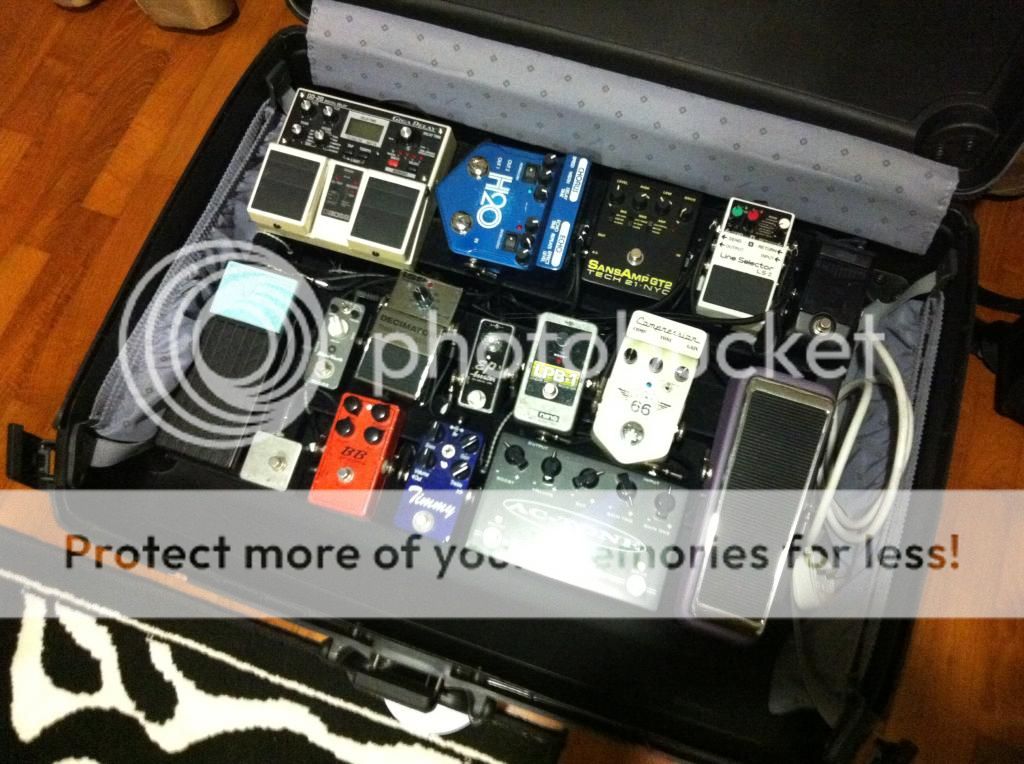
I totally stole this idea off Mervin John, guitarist and band leader extraordinaire, when he brought his rig down for us to check out during our band arrangement class. If you have a heavy pedalboard, need a luggage-chucking grade case which has wheels and can be locked during transit, you can most certainly use:


I suppose I'll lose some baggage allowance and won't be able to buy back snacks for anybody when I'm away on tour, but it's a necessary sacrifice on the war on tone. There's no need to fork out $200 on a ATA flight case with wheels, save for the fact that it's probably the more elegant and pro looking way of transportation than this!

Friday, March 22, 2013

The Memories of IRC

I recently installed a chat box onto my blog page for fun. Remember the good 'ol days of IRC? I thought I'd try to be more interactive by allowing a public chat box for people to interact, discuss, and share their thoughts. You'll find a link to my Contact page here:

http://coffeeholicsstudios.blogspot.sg/p/contact-me.html

Try it out, and let's see how this goes!

For further action:
Get your own chat box!

Thursday, February 28, 2013

Jailbreak Woes Part 2: When Apps Crash on Loading

I used iMovie for a good part of an afternoon to film and edit clips. It was easily 3 hours worth of work, and I was wrapping up the day's editing and ready to export my videos.

The unthinkable happened. I exited the app to check out my Whatsapp messages, and when I tried to re-open the app, it just won't open. Every method I tried resulted in the same result: app crash! I tried to kill the app from the app switcher and re-open the app. I tried soft resets, hard resets, using iCleaner, checking out if files were corrupted using iFile...everything didn't work!

Then the thought occurred to me that maybe it was crashing because I was working on a new movie project, I wasn't satisfied with the clip, removed the clip (so the project board was empty) and exited the app at the same time. This meant that iMovie was trying to save a project that had an empty project board.

So I rebooted my iPad in Safe Mode--and it worked! I could load iMovie without it crashing on me. And true enough, the project I was working on was empty, as the title screen for that project was showing a total duration of 0:00. I removed that dud project, exited Safe Mode, and I was back in business.

Safe Mode. It really works.

And here's the video I was making that started with a dud project board:

How to spot a vintage stratocaster

Thursday, February 7, 2013

Jailbreak Woes: Removing Siriport from iPhone


No sooner had I started to jailbreak iOS 6.1 did I encounter numerous problems. Well, it's mostly my fault. You see, in my zeal to squeeze the most out of my device, I end up trusting questionable sources. For a long time, I wanted to have Siri on my iPhone 4. In case you don't know why iPhone 4 doesn't have Siri, that's due to the fact that Apple's A4 chip doesn't have noise-cancellation. This was only implemented with the A5 chip, which was introduced in the iPhone 4s. That makes sense, as you need Siri to understand what you're saying amidst background noise.

So I went and searched for a way to get Siri onto my iPhone 4. There are workarounds, but I wanted the real deal, and hence settled for Siriport. What I didn't know was that Siriport was a pirated version of the official Siri (there's a lengthy article on the specifics behind Siriport's architecture and how it works, but that's beyond the scope of this post). I followed the instructions to get Siriport, resprung my phone, and I managed to get my phone into an infinite boot loop. This is where the apple never moves!

Of course, I panicked. But there is always a solution to get a phone out of the infinite boot loop. The problem was that there was no way to access the phone's file system while the phone is essentially a brick...or was there?

Enter iFunBox. This third party desktop software helps to install .ipa packages onto the iPhone, and it still can connect to a phone that's in an infinite boot loop. The only problem I faced was that when I connected the phone with a USB cable, iFunBox would sometimes either lose connection or not connect at all. If you are experiencing this, be patient; you are trying to fix a (temporarily) spoilt phone.

Removing Siriport and Breaking Out of Infinite Boot Loop

What you need: iFunBox and a USB cable.

Step 1: Connect the phone to your computer with the USB cable. Run iFunBox.

Step 2: Find the Raw File System folder, and go to the /System/Library/LaunchDaemons folder.

Step 3: Open the com.apple.SpringBoard.plist in Wordpad.

Step 4: Remove the following

EnvironmentVariables
        DYLD_SHARED_CACHE_DIR 
                 /var/siriport.ru/Cache4SDYLD_SHARED_CACHE_DONT_VALIDATE
1 DYLD_SHARED_REGION private


Remember to save!

Step 5: Go to the root folder (Raw File System), do a search for Siri, and delete the files and folders that are associated with Siri.ru. There should be 14 items of files and folders to delete.

Step 6: Disconnect your phone, and do a hard reset (hold the home and power button, release when the Apple logo comes up). Your phone should be back. If not, repeat the whole process again--I had to try this 3 times, and the hard reset took roughly 2 minutes.

Lesson learnt: Never trust dodgy sources!

Resources

Friday, February 1, 2013

Recycling by Repurposing

Being engineering-trained does have its real-life benefits. I'm huge on recycling, which if left unchecked, could lead to a mild case of hoarding, because I see that everything can be repurposed to suit other needs. Yes, they were originally designed to do something else, and they will probably serve their greatest use in that manner, but once the original need has expired, it's such a waste to throw it away.


Take the above two for example. I originally had an external hard disk that gave way a while ago, so the hard disk stand was going to be thrown out until I saw that it could fit my air conditioner remote--so it became an air conditioner remote stand. Not exactly what it was purposed to do, but it sure made a more stylish remote stand.

You know those expensive sweet containers made out of aluminium and over-provided protection for sweets? I found that it was just the right size for my earphones, and this time, the protection was warranted. So my earphones found a new case in the form of an Eclipse sweet container, and I think it's been well protected since!

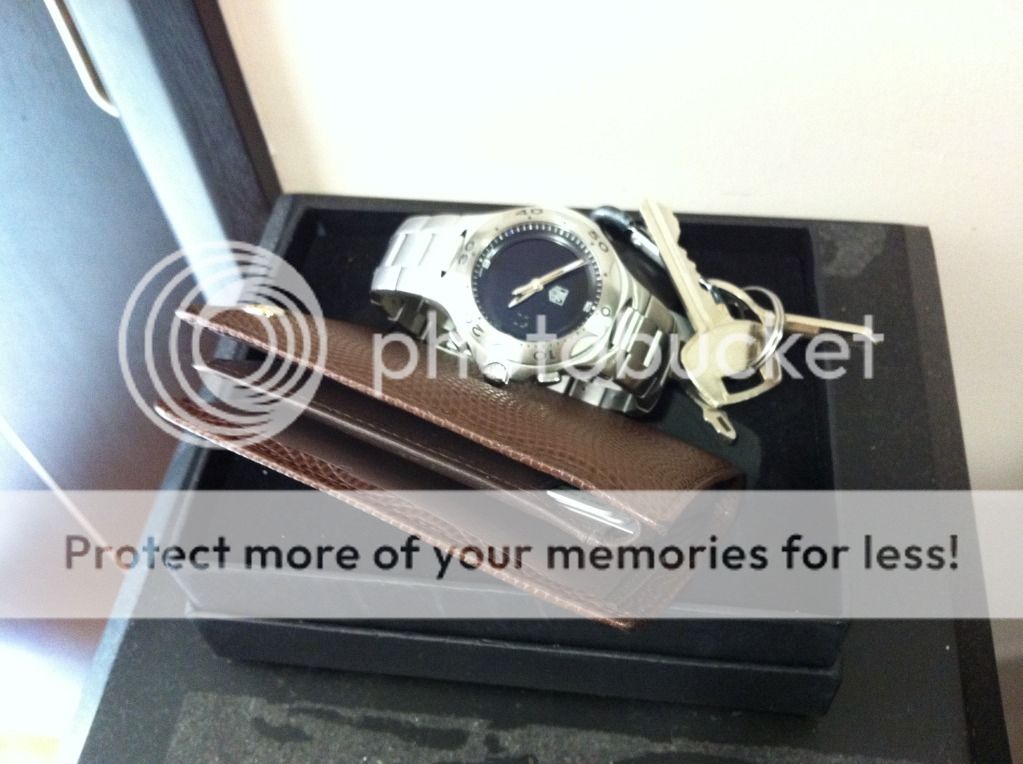
Take a gift box for a wireless mouse, and it can be fashioned to prop up your wallet, keys, and watch:

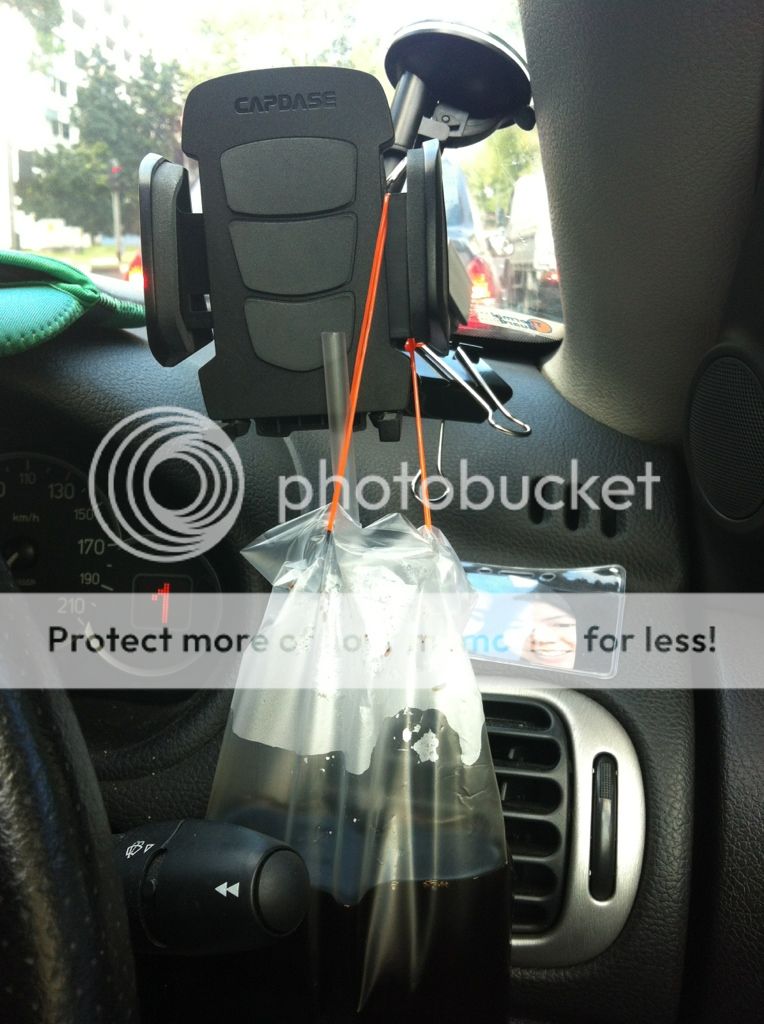
And last but not least, and certainly one of my favorites, here's what I do when I have an open packet of kopi-o and I have no where in the car to put it:


My piece of advice: something of no purpose (or expired purpose) can find purpose again. It's a matter of finding it.

Twitter Delicious Facebook Digg Stumbleupon Favorites More